NEWS
01/03: Bright training clinics start today!
Article summary for testing Article summary for testing Article summary for testing Article summary for testing Article summary for testing Article summary for testing
Bright Training Clinics start today!
Starting today, we’re holding regular training clinics at your local association. They will be held throughout the month of January. Come with your MLS questions or issues and we’ll work directly with you to help resolve them. We hope to see you there!
View available times and register here.
IMPORTANT: Bright MLS system maintenance tonight
Don’t forget - we will be performing system maintenance tonight, January 3rd from 10pm to 1am tomorrow, January 4th. BrightMLS.com, Listing Management and Search are expected to be unavailable during this timeframe. Thank you for your understanding!
Appraiser Tip: Export with more than 50 fields? Create a custom export.
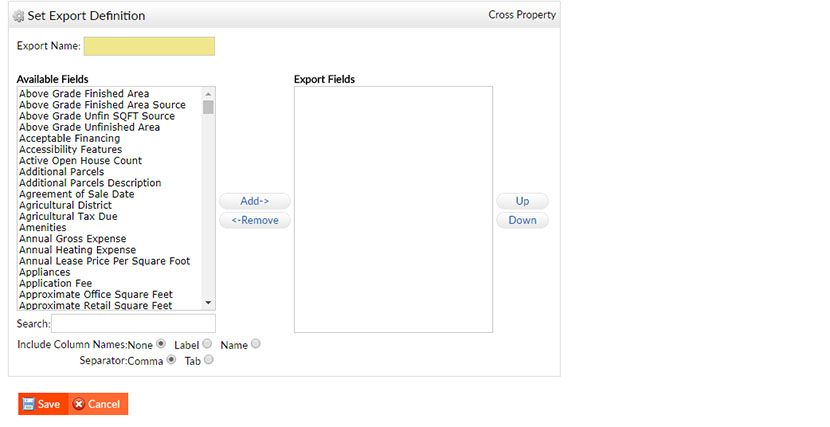
If your export contains more than 50 fields (the maximum for the One-Line display), you can create a custom export! Here’s how:
-
When you are logged into Bright MLS, click on your name in the upper-right corner of the Bright MLS website and click on Accounts and Settings.
-
Select MLS Settings.
-
Scroll to the bottom and click on the second to last option, Custom Exports.
-
Select Add Export, then give the export a name and build the fields in the order you want them.
-
When you’re finished, click Save and your newly created export will be available the next time you go to export.